Introduction to Emacs | 02x00.03-02
TL;DR
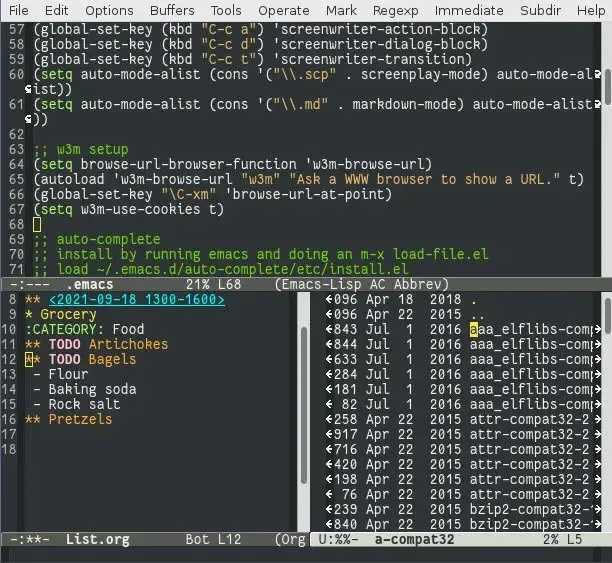
A beginner's guide to Emacs, the highly extensible editor created within Richard Stallman's GNU project. It covers opening and saving files, buffers, the mark and point for selecting regions, cutting and pasting, searching, running commands by name with M-x, undo, cancelling with C-g and quitting.
On this page
Emacs is not just a text editor; it is a powerful tool that can revolutionize the way you interact with your computer. This article will guide you through the basics of Emacs, including its history, fundamental concepts, and essential commands that every user should know. Whether you are a beginner or looking to refresh your knowledge, this guide will help you get the most out of Emacs.
What is Emacs
Emacs is a highly customizable and extensible text editor. It is known for its powerful editing features and the ability to be tailored to the user’s specific needs. Emacs is more than just a text editor; it is often referred to as an “operating system” for editing text due to its wide range of capabilities, including text manipulation, file management, and even web browsing.
Who is Richard Stallman
Richard Stallman is an American free software movement activist and programmer. He launched the GNU Project to create a free Unix-like operating system and is the founder of the Free Software Foundation. Stallman developed the original version of Emacs, known as GNU Emacs, which has become one of the most popular versions of Emacs.

How to Open and Save Files
To open a file in Emacs, use the command:
C-x C-fThis will prompt you to enter the file name or path. To save a file, use the command:
C-x C-sIf you want to save the file under a different name, use:
C-x C-wand enter the new file name.
What is a Buffer and How to Switch from One to Another
In Emacs, a buffer is an area of memory where text is held. Each open file is associated with its own buffer. To switch between buffers, you can use the command:
C-x band enter the name of the buffer you want to switch to. You can also use:
C-x C-bto list all open buffers and switch to one from the list.
How to Use the Mark and the Point to Set the Region
The “point” is the current position of the cursor in the buffer, and the “mark” is a position that you set to define a region of text. To set the mark, use:
C-SPCThe region is the text between the point and the mark. You can perform operations on this region, such as cutting, copying, or pasting.
How to Cut and Paste Lines and Regions
To cut (or “kill”) a region of text, set the mark at the beginning of the region, move the point to the end, and use:
C-wTo paste (or “yank”) the text, move the point to the desired location and use:
C-yTo copy (or “kill-ring-save”) a region without deleting it, use:
M-w(Meta-w, often mapped to Alt-w).
How to Search Forward and Backward
To search forward in the text, use the command:
C-sand enter the search term. Emacs will highlight the occurrences as you type. To search backward, use:
C-rand enter the search term.
How to Invoke Commands by Name
In Emacs, you can invoke commands by their name using:
M-x(Meta-x, often mapped to Alt-x). After typing M-x, you can enter the name of the command you want to execute. For example, to save all buffers, you can type:
M-x save-some-buffersHow to Undo
To undo the last change, use the command:
C-/or:
C-x u(Control-x followed by u). You can continue to undo previous changes by repeating the command.
How to Cancel Half-entered Commands
If you start entering a command and want to cancel it, use:
C-gThis will abort the current command and return Emacs to its normal state.
How to Quit Emacs
To quit Emacs, use the command:
C-x C-cEmacs will prompt you to save any unsaved buffers before exiting.
Conclusion
Emacs is a versatile and powerful tool for text editing and more. By mastering the basic commands and understanding its core concepts, you can greatly enhance your productivity. Remember, Emacs is highly customizable, so you can adapt it to fit your specific needs and workflow. As you continue to explore Emacs, you’ll discover even more features and capabilities that make it an indispensable tool for many programmers and writers.
Key takeaways 5
- Emacs is a highly customizable, extensible text editor.
- Richard Stallman created GNU Emacs and founded the free software movement.
- Buffers hold open files; switch between them quickly.
- The mark and point define a region to cut, copy or paste.
- M-x runs any command by name, and C-g cancels a half-typed command.
Watch & learn
Frequently asked questions
How do I save and quit in Emacs?
Save with C-x C-s (Ctrl+x then Ctrl+s) and quit with C-x C-c. C-g cancels a command you started by mistake.
What is a buffer in Emacs?
A buffer is the in-memory object holding a file's contents or other text. You can have many buffers open and switch between them with C-x b.
Is Emacs or Vim better?
Both are powerful. Emacs is a highly extensible environment built around Emacs Lisp; Vim focuses on fast modal editing. The best choice depends on your workflow and preference.
Learn it hands-on at AL Academy
Free practical programs in software, automation and IT, with labs and certificates.
Related articles
Introduction to Vi | 02x00.03-03
Vi is a powerful and efficient text editor that has been a standard in Unix and Unix-like operating systems for decades.
Basic Unix Commands | 02x00.06-01
To navigate through the file system in Unix, you use the cd (change directory) command. Here are some examples:
Introduction to Nano | 02x00.03-01
Nano is a user-friendly text editor that has been a staple in Unix and Unix-like systems since its inception.
Comments
No comments yet. Start the conversation.