How the Web Works (DNS, HTTP, HTTPS)
Type an address, hit Enter, see a page. Here is the quiet relay of systems that makes that one second possible, and why knowing it turns web mysteries into simple diagnoses.
TL;DR
Loading a web page is a fast relay of independent systems. DNS translates the name into an IP address, TCP opens a connection, TLS secures it for HTTPS, and HTTP carries the request and response between your browser and the server. Knowing the relay turns web mysteries into simple diagnoses.
On this page
You do it dozens of times a day without a thought. You type a web address, press Enter, and a page appears. It feels instant and singular, like flipping a switch. It is actually a fast, coordinated handoff between several independent systems, each doing one job and passing the work along. Once you can see those handoffs, the web stops feeling like magic and starts feeling like plumbing you can reason about.
Let us follow a single visit to example.com and watch the relay run.
First, a name becomes a number
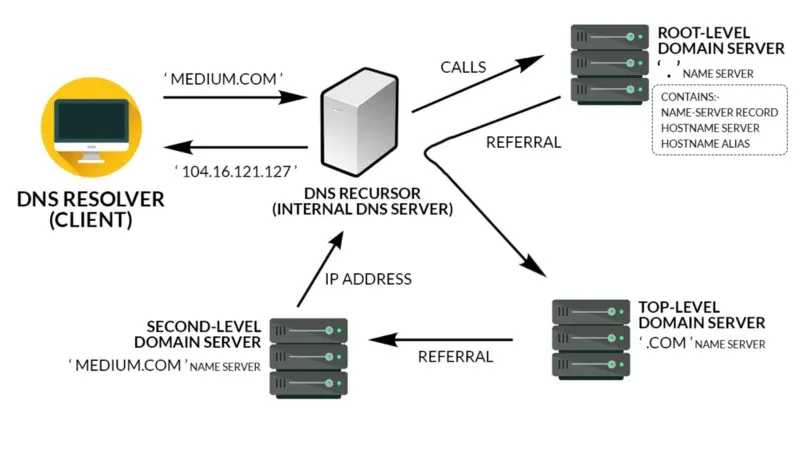
Your browser cannot send anything to “example.com” directly. Networks route by numeric IP addresses, not by names. So the very first move is a translation, handled by the Domain Name System, or DNS.
Think of DNS as the phone book of the internet. Your computer asks a resolver, “what is the address for example.com?” The resolver, if it does not already have the answer cached, walks a hierarchy: it asks the root of the system where to find .com, asks the .com servers where to find example.com, and asks that domain’s authoritative server for the final number. Back comes something like 93.184.216.34, along with a hint about how long the answer may be reused before asking again.
This indirection is what makes the web flexible. A site can move to a new server, a new provider, or a new continent, and as long as DNS is updated, the name you type stays exactly the same.
Then, a polite conversation begins
With an address in hand, the browser opens a connection to that machine and starts speaking HTTP, the language of the web. HTTP is refreshingly simple: the client asks, the server answers. Nothing more exotic than that.
The request is mostly plain text. It names a method and a path, roughly “GET me the page at slash.” The server does its work, perhaps pulling files or running an application, and sends back a response. The response opens with a status code, the single most informative number on the web.
You already know some of these codes by their symptoms. A 200 means success. A 404 means the page is not there. A 301 means the content moved and here is the new spot. Anything in the 400s means your request was the problem; anything in the 500s means the server stumbled. Learning to read that first line is like learning to read a thermometer: one glance and you know what kind of trouble you are in.
And the conversation is sealed
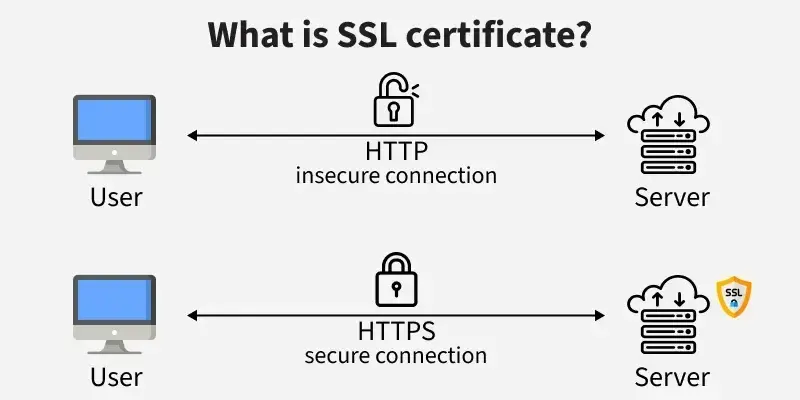
If you noticed the s in https, that letter is doing heavy lifting. Plain HTTP travels as readable text, which means anyone sharing your coffee-shop Wi-Fi or sitting on the network path could read or even alter it. HTTPS closes that gap by wrapping the whole conversation in TLS encryption.
Before any real request is sent, the two sides perform a handshake. The server presents a certificate, a signed document proving it really is example.com and not an impostor. Your browser checks that certificate against a built-in list of trusted authorities. If it checks out, the two sides agree on secret keys and everything from that point on is scrambled to outsiders. If it does not check out, you get that stern warning screen instead of the page. That padlock in your address bar is the visible sign that this handshake succeeded.
The machine on the other end
The thing answering all of this is a server, which is simply a computer running software that listens for requests around the clock. Hosting is the business of keeping such a machine online and connected so your site is always reachable, whether that is a shared box, a private slice, or elastic capacity in the cloud. Many sites also lean on a content delivery network, which keeps copies of files in data centers worldwide so visitors download from somewhere nearby and pages load faster.
Why this map is worth carrying
Here is the practical payoff. Every web failure lives at one of these stages, and the symptom tells you which one. “Server not found” is DNS failing to translate the name. A certificate warning is the TLS handshake refusing to trust the other side. A 404 is your request reaching for something that is not there. A 500 is the server itself falling over.
So the next time a page will not load, you are not staring at an opaque wall. You are looking at a relay with four clear stations: name to number, request to response, plain to secure, and a server waiting to answer. Name the station, and you are already halfway to the fix. That is the whole secret of how the web works, and it fits comfortably in your head.
Key takeaways 5
- DNS translates domain names into IP addresses.
- HTTP is a request-and-response conversation between browser and server.
- HTTPS adds TLS encryption and verifies the server's identity.
- The server returns HTML, then the browser fetches CSS, JavaScript and images.
- Knowing each step helps you diagnose what broke.
Watch & learn

Frequently asked questions
What happens when you type a URL in the browser?
The browser looks up the domain's IP address through DNS, connects to the server, sets up encryption with TLS for HTTPS, sends an HTTP request and renders the HTML and assets that come back.
What is DNS?
DNS (Domain Name System) is the internet's directory: it translates human-readable domain names like example.com into the numeric IP addresses computers use to connect.
What is the difference between HTTP and HTTPS?
HTTPS is HTTP sent over an encrypted TLS connection. It protects data from eavesdropping and tampering and proves the website is who it claims to be.
Go deeper with the free masterclass
Workshop, PDF handbook and curated resources for “How the Web Works (DNS, HTTP, HTTPS)”.
Related articles
SSL/TLS & Web Security Basics
The padlock is not a trophy. It is a promise about exactly three things, and understanding what it does and does not cover is the difference between a site that is secure and one that merely looks it.
Registering Domains & Managing DNS
Buying a domain is the easy part. The real skill is knowing which DNS record to add, where to add it, and why your change has not shown up yet.
Serverless Web Hosting from Scratch
You don't need a server, a sysadmin, or a credit card to put a website online. Here's why a plain folder of files can quietly handle a flood of visitors - for free.
Comments
No comments yet. Start the conversation.