SSL/TLS & Web Security Basics
The padlock is not a trophy. It is a promise about exactly three things, and understanding what it does and does not cover is the difference between a site that is secure and one that merely looks it.
TL;DR
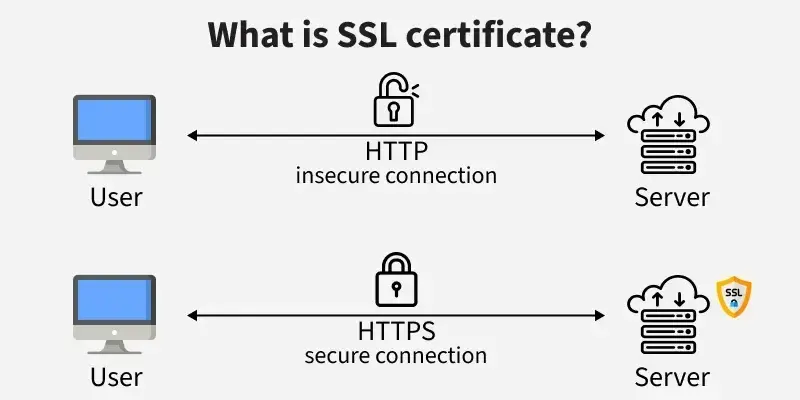
The browser padlock promises exactly three things: encryption, integrity and authentication of the domain. It says nothing about whether the site is honest or its code secure. Certificates are now free and automated, so encrypt everything, avoid mixed content, add HSTS and remember that TLS is necessary but not sufficient.
On this page
For most of the web’s history, encryption was treated as a luxury. You bought a certificate when you handled credit cards, bolted it onto the checkout page, and ran everything else over plain HTTP because TLS was “slow” and “expensive.” That folklore has outlived its facts by a decade. Certificates are now free and automated, modern hardware makes encryption effectively free in CPU terms, and browsers have quietly redrawn the social contract: an unencrypted site is no longer neutral, it is flagged as suspect. Yet the old mental model lingers, and with it a set of misunderstandings that produce sites which are technically encrypted and still meaningfully insecure.
So it is worth being precise about what that padlock actually promises.
Three guarantees, no more and no fewer
TLS gives you confidentiality, integrity, and authenticity. Confidentiality means an eavesdropper on the network sees scrambled bytes instead of your password. Integrity means that if someone tampers with the data in flight, the tampering is detected and the connection breaks rather than silently delivering altered content. Authenticity means you can be confident you are talking to the real server for that domain and not an impostor sitting in the middle.
That third guarantee is the one people forget, and it is arguably the most important. Encryption without authentication is nearly useless: you would be having a perfectly private conversation with an attacker. The certificate, and the chain of trust behind it, is what ties the encrypted channel to a specific verified identity. When a browser throws up a full-page warning over an expired or mismatched certificate, it is not being fussy. It is refusing to let you have a confidential conversation with someone whose identity it cannot vouch for.
What the padlock does not say
Here is where the trophy mentality gets people hurt. The padlock means the connection is private. It does not mean the site is honest. A phishing page that perfectly imitates your bank can hold a valid certificate, because a domain-validated certificate proves only that whoever requested it controls the domain, not that they are virtuous. The lock icon is a statement about the pipe, never about the building at the other end.
It also says nothing about what happens once your data arrives. TLS protects bytes in transit between two endpoints. The moment they reach the server, TLS is finished; whether they are then stored encrypted, logged in plaintext, or leaked through a buggy query is an entirely separate concern. SQL injection and cross-site scripting travel through the encrypted tunnel as faithfully as legitimate traffic. TLS is the armoured truck; it does not audit what you load into it or what the warehouse does with the delivery.
Why partial is worse than it looks
The instinct to encrypt “just the sensitive pages” is the most dangerous remnant of the old model. If the login form is HTTPS but the rest of the site is HTTP, the session cookie issued at login rides over plain HTTP on every subsequent page. An attacker on the same network does not need your password; they can lift the cookie and become you. Partial encryption also hands attackers a downgrade opportunity: intercept the first plain-HTTP request and quietly strip away the upgrade so the victim never reaches the secure version at all.
The only robust posture is HTTPS on every request, a permanent redirect from HTTP, and HSTS, a header that tells the browser to refuse plain HTTP for your domain entirely. HSTS closes the stripping window after the first visit, and preloading closes it even for the first.
The connection is necessary, not sufficient
A hardened TLS configuration earns you an A on a server test, and you should pursue it: modern protocols only, forward-secret cipher suites, OCSP stapling, no legacy cruft. But the browser still has to render whatever the server sends, and that is where a second, cheaper layer of defense lives. A handful of response headers, costing nothing and requiring no application changes, instruct the browser to refuse risky behaviour. Content-Security-Policy turns most cross-site scripting from a breach into a blocked request. X-Frame-Options stops your pages from being weaponized inside a clickjacking iframe. X-Content-Type-Options stops the browser from guessing a file’s type and executing an uploaded “image” as script. Marking cookies Secure, HttpOnly, and SameSite blunts the most common theft and forgery attacks in three short flags.
The real takeaway
Web security is layered, and TLS is the foundation rather than the whole house. The padlock is a precise, limited promise: this conversation is private, intact, and with the party I expected. Build on it deliberately, force it everywhere, harden the connection, then add the headers that protect the content once it lands. Do that and you have a site that is not just wearing the costume of security but is genuinely defensible, which, now that the cost has dropped to nearly zero, is simply the baseline the modern web expects.
Key takeaways 5
- TLS provides confidentiality, integrity and server authentication.
- The padlock doesn't mean a site is trustworthy or bug-free.
- Free certificates, such as Let's Encrypt, make HTTPS everywhere easy.
- Partial HTTPS and mixed content undermine protection.
- HSTS and modern TLS settings harden the connection.
Watch & learn

Frequently asked questions
What is the difference between SSL and TLS?
TLS is the modern successor to SSL. SSL versions are obsolete and insecure; today's HTTPS uses TLS 1.2 or 1.3, though the name "SSL" is still commonly used.
Does HTTPS mean a website is safe?
No. HTTPS means the connection is encrypted and the domain is verified. Phishing and malicious sites can also use HTTPS.
What is HSTS?
HTTP Strict Transport Security is a header that tells browsers to always connect to a site over HTTPS, preventing downgrade attacks and accidental HTTP connections.
Go deeper with the free masterclass
Workshop, PDF handbook and curated resources for “SSL/TLS & Web Security Basics”.
Related articles
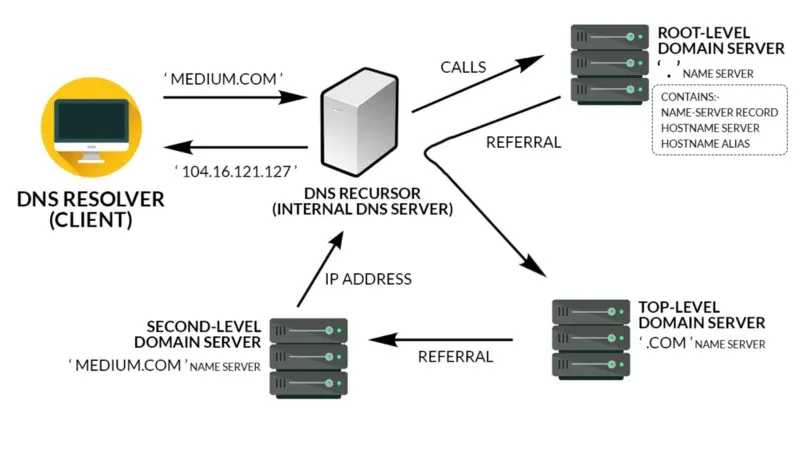
How the Web Works (DNS, HTTP, HTTPS)
Type an address, hit Enter, see a page. Here is the quiet relay of systems that makes that one second possible, and why knowing it turns web mysteries into simple diagnoses.
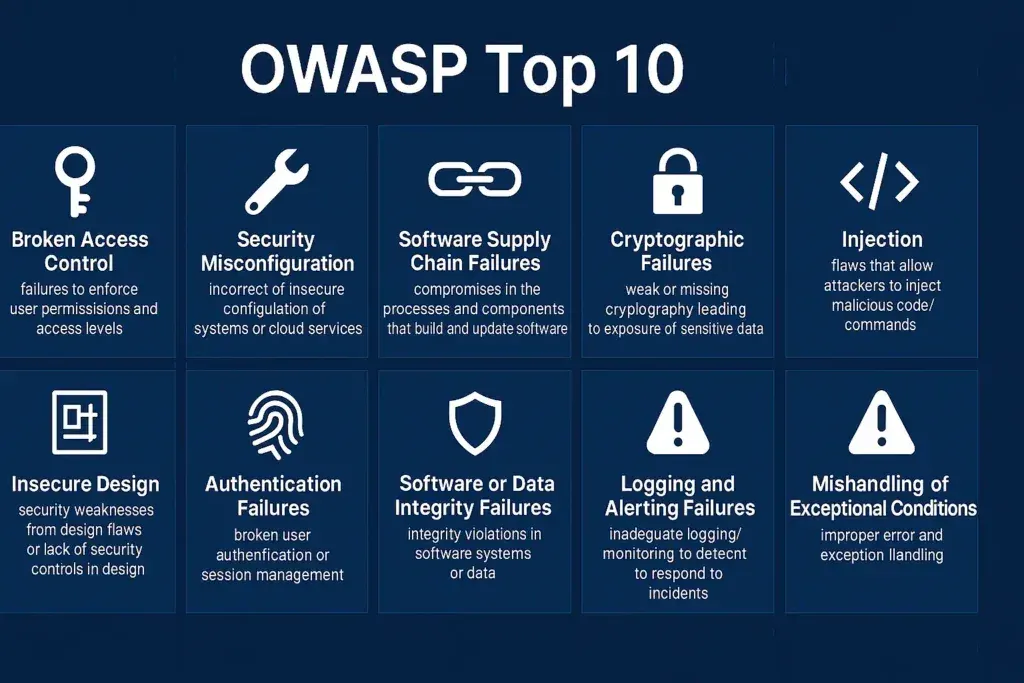
Application Security & the OWASP Top 10
The OWASP Top 10 is not a test to pass once. It is a way of thinking about the software you ship every day.
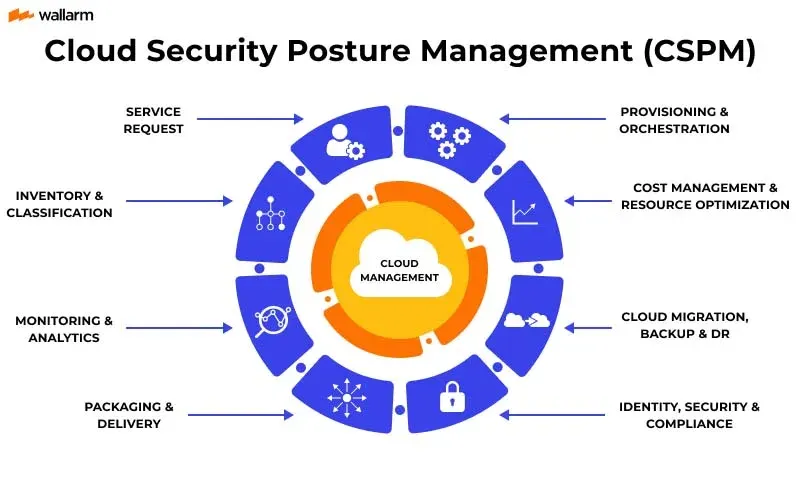
Cloud Security Posture Basics
The cloud did not make you less secure. It made misconfiguration faster, more visible, and one click away from the entire internet. Here is how to see your own account the way an attacker already does.
Comments
No comments yet. Start the conversation.