Network Security Basics (Firewalls & VPN)
Firewalls and VPNs sound like enterprise jargon, but the ideas behind them are simple and within reach for any small network. Here is how to think about defending one.
TL;DR
Network security isn't one perfect wall but defense in depth: several modest barriers so that when one fails, the next holds. Every connected device is a possible doorway, so use firewalls to control traffic, segment the network, keep devices updated, use VPNs for remote access and monitor what you can.
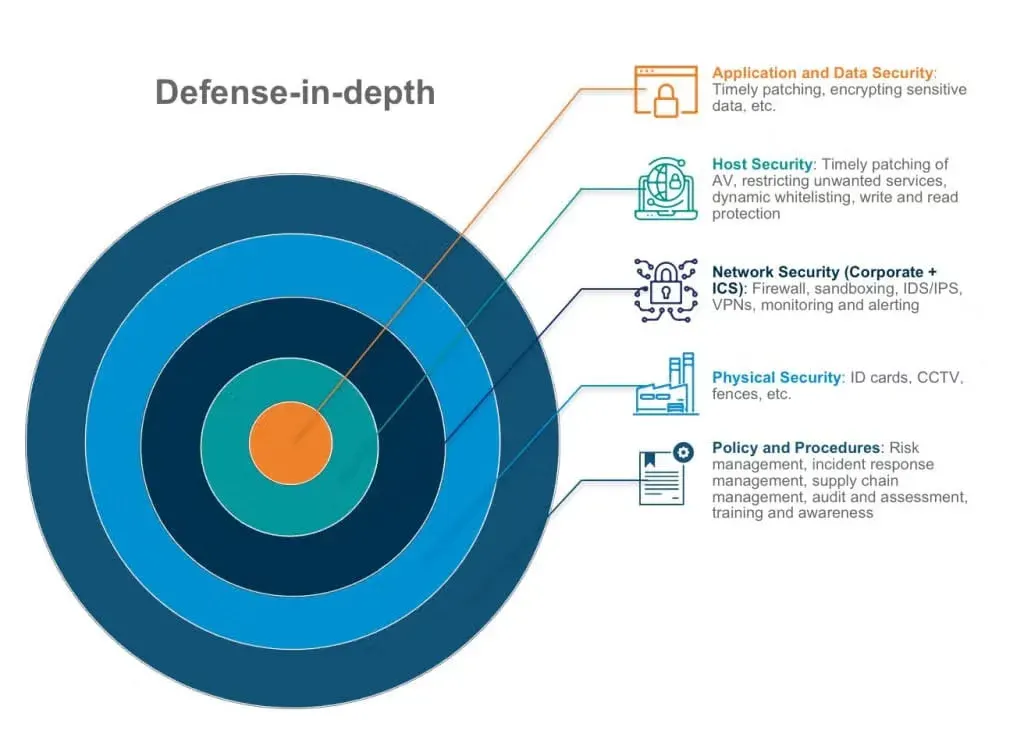
Ask most people how they would secure a network and they picture a single, impenetrable wall. The reality is friendlier and more forgiving. Good network security is not one perfect barrier; it is several modest barriers stacked so that when one is bypassed, the next still holds. That idea, defense in depth, is the whole game, and you can apply it at home or in a small business without a budget or a degree.
Start by accepting an uncomfortable truth: every device you connect is a possible doorway. The laptop, the phone, the printer, the smart TV, the camera, the router itself, each one listens for traffic and runs software that can be reached. The total of all those reachable doorways is your attack surface. You cannot make it vanish, but you can make it small and well understood. The first and most powerful move costs nothing: write down what you have and which connections each device genuinely needs. Once you know what should talk to what, everything else becomes traffic you can confidently block.
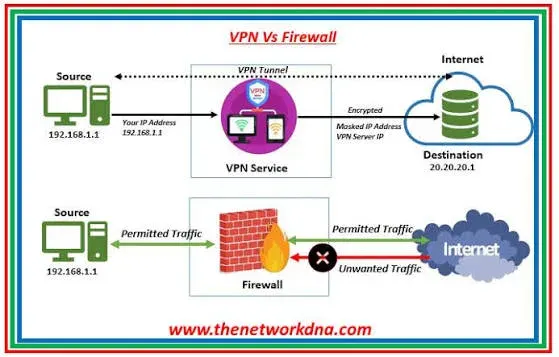
The first barrier is the firewall. Strip away the mystique and a firewall is a guard at a boundary that decides which traffic passes. The useful kind is stateful: it remembers the connections you start, lets their replies back in, and treats anything unsolicited from the internet as a stranger to be turned away. This is why a typical home router is reasonably safe out of the box. The connections you initiate are allowed, and uninvited inbound connections are denied by default. Protecting that single behavior, default-deny-inbound, matters more than any advanced feature. When you do write rules, follow one principle: allow only what you need and deny the rest. Remember that firewalls read rules top to bottom and stop at the first match, so a broad allow placed above a specific deny quietly defeats the deny.
A firewall guards the boundary, but what about inside? On a flat network where everything can reach everything, a single infected guest phone can scan straight for your file server. That sideways spread is called lateral movement, and it turns a small slip into a full breach. The fix is segmentation: dividing the network into zones with controlled gates. Your guest Wi-Fi reaches the internet but not your accounting computer. Your smart bulbs and cameras, which are notoriously insecure and rarely updated, live in their own zone that cannot touch your real data. You do not need extra hardware to begin. Most routers offer a guest network toggle, and that one switch is a genuine, immediate win. The rule at every internal gate is the same as at the edge: deny by default, then permit only the specific flows you actually want.
Eventually someone needs to reach the network from outside, and this is where good intentions often go wrong. The tempting shortcut is to open a service like remote desktop straight to the internet. Automated scanners find such services within minutes and hammer them relentlessly. The safe alternative is a VPN, a virtual private network, which creates an encrypted, authenticated tunnel into your network. Instead of leaving a service exposed for the entire internet to attack, you provide one hardened door that a person must unlock before they can reach anything. Two cautions help here. First, the business-relevant VPN is the remote-access kind that lets trusted people connect in; it is not the same as a commercial privacy VPN that hides your personal browsing, which does nothing to protect an office. Second, a VPN is only as strong as how you run it: require multi-factor authentication so a stolen password alone is useless, keep the VPN software patched because it is itself an exposed service, and let each connection reach only what its user’s role requires.
The last common weak point is the one that travels through walls. Wi-Fi is convenient precisely because anyone within range can try to join, so it deserves real attention. Use modern encryption, WPA3 if your devices support it or WPA2 if not, and never run the obsolete WEP or an open trusted network. Set a long passphrase made of several unrelated words, which is far harder to crack than a short complex one. Change the default network name and turn off WPS if it is enabled. Then harden the device that controls all of this, the router. It is often configured once and never touched again, which is exactly why it is a favorite target. Change its default admin password, update its firmware and enable automatic updates, switch off remote administration from the internet, and disable features you do not use, such as UPnP, which lets devices open inbound holes on their own.
None of this requires exotic equipment. It is a stack of sensible layers: a default-deny firewall at the edge, segmentation so trouble stays contained, a VPN with multi-factor authentication for anyone working remotely, modern Wi-Fi encryption, and a hardened, updated router, all sitting on top of well-maintained devices with offline backups you have actually tested. Configure these once with care, then revisit them on a schedule, because networks quietly accumulate forgotten openings over time.
That schedule is the quiet secret. Security is not a project you finish; it is a habit you keep. Check for updates monthly, review your firewall rules quarterly, remove devices and accounts you no longer use, and re-confirm that your guest and IoT zones really are isolated. Do that, and with nothing but patient, entirely defensive effort, you will have closed the overwhelming majority of the paths attackers count on, one modest layer at a time.
Key takeaways 5
- Defense in depth beats a single perfect barrier.
- Every connected device is a possible entry point.
- Firewalls allow only the traffic you intend.
- Segment networks so one compromised device can't reach everything.
- Use VPNs to secure remote access and untrusted networks.
Watch & learn

Frequently asked questions
What does a firewall do?
A firewall filters network traffic based on rules, allowing expected connections and blocking unwanted ones, to protect devices and networks from unauthorized access.
What is a VPN used for?
A VPN creates an encrypted tunnel over the internet, used to connect securely to a private network remotely or to protect traffic on untrusted networks like public Wi-Fi.
What is network segmentation?
Network segmentation divides a network into separate zones, for example guests, IoT devices and business systems, so a compromise in one zone cannot easily spread to others.
Go deeper with the free masterclass
Workshop, PDF handbook and curated resources for “Network Security Basics (Firewalls & VPN)”.
Related articles
Securing Industrial Control Systems: Deep Dive
Defending industrial control systems is not IT security with a hard hat - it is a different discipline where availability and safety outrank everything, and visibility beats patching.
Zero Trust Architecture Explained
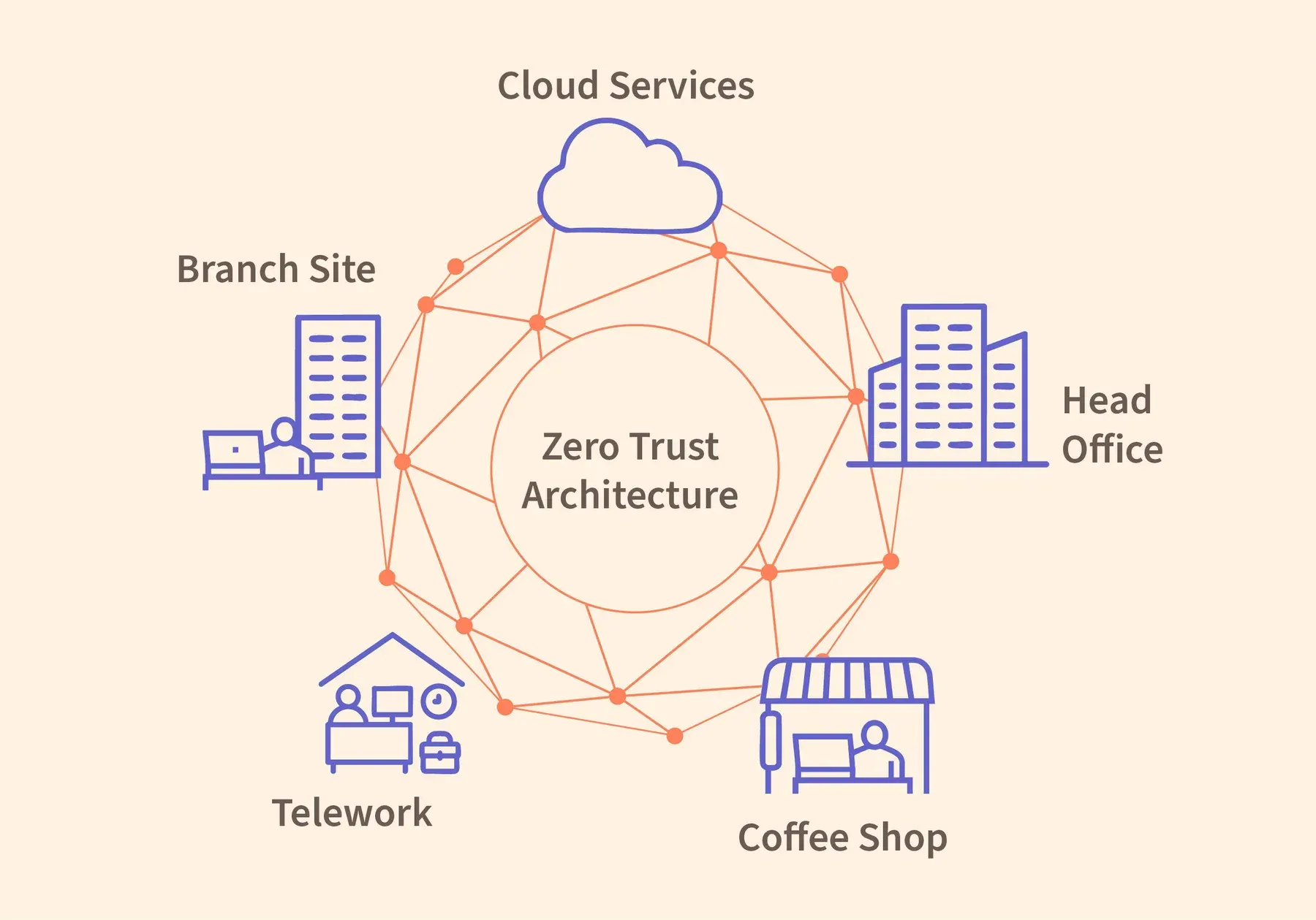
The perimeter was never a wall. It was an assumption, and assumptions are exactly what attackers exploit.
Cloud Security Posture Basics
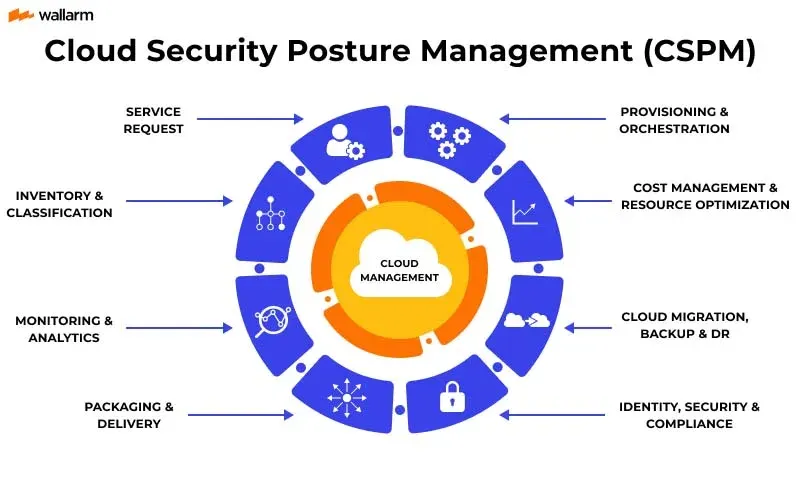
The cloud did not make you less secure. It made misconfiguration faster, more visible, and one click away from the entire internet. Here is how to see your own account the way an attacker already does.
Comments
No comments yet. Start the conversation.