Hardware Diagnostics & Repair
Anyone can swap a part. The skill that separates a real technician from a parts-changer is a method that lets the broken machine tell you what is wrong.
TL;DR
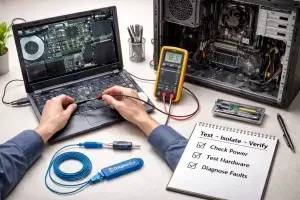
A PC is one of the most diagnosable machines there is, because it constantly reports what is wrong. Real technicians follow a method instead of swapping parts at random: gather symptoms, isolate variables, test one change at a time, read POST codes, beeps and logs, and protect both the hardware and the user's data.
On this page
The machine is not a mystery
The first time you open a desktop with a fault, it feels like staring into an engine you are not qualified to touch. Boards, fans, ribbons of cable, components with cryptic labels. Newcomers respond in one of two ways: they freeze, or they start swapping parts and reinstalling software at random, hoping something sticks. Both come from the same place - treating the computer as a black box whose moods are unknowable.
It is not a black box. A PC is one of the most diagnosable machines you will ever work on, because it is built to be taken apart and because it is constantly trying to tell you what is wrong. The job of a technician is not to memorise every failure mode in existence. It is to listen to what the machine reports, ask it the right questions through deliberate tests, and narrow a vague complaint down to a single faulty subsystem. Done well, “it just won’t start” becomes “the second RAM stick is dead” in twenty unhurried minutes.
Method beats memory
The most useful thing I can give a beginner is not a list of faults but a loop to run on every one of them: identify the symptom precisely, isolate which subsystem could cause it, test to prove which one it actually is, apply the smallest fix, and then verify the fix holds. That sequence sounds obvious written down. Under pressure, with a customer waiting and a dead machine on the bench, it is the discipline that almost nobody follows and that solves almost everything.
The two habits inside that loop matter most. The first is to define the symptom in concrete terms. “It doesn’t work” is useless. “Fans spin, a single memory LED stays lit, no image on screen” is a near-complete diagnosis on its own. The second is to change exactly one thing at a time. The moment you reseat the RAM, swap the cable, and clear the BIOS all at once, you have surrendered your ability to know what was actually wrong - and you have learned nothing you can use next time. Slow, single, reversible changes feel inefficient. They are the fastest path there is.
Let the machine talk
Before any operating system loads, the firmware runs a power-on self-test, checking that the processor, memory, and core devices are present and responding. When that test fails, the computer does not stay silent. Older systems emit beep codes; modern boards light a labelled LED for CPU, memory, graphics, or boot. Either way, the machine is pointing at the failed subsystem before you have removed a single screw. Learning to read those codes is the single biggest shortcut in hardware work, and it costs nothing but the motherboard manual.
The same principle runs through every good diagnostic tool. A bootable memory tester writes patterns to every address and reads them back, catching faults the operating system never would. Drives keep their own health log through S.M.A.R.T., and a free utility translates rising reallocated-sector counts into a plain warning to back up now. A stress test deliberately heats the system to surface the intermittent crash that only ever happens under load. Windows itself keeps an event log that quietly records every unexpected shutdown and disk error. None of these are exotic. All of them turn a guess into a fact, which is the whole game.
Respect the hardware, respect the data
Two cautions separate the careful tech from the one who creates new problems. The first is electrostatic discharge. A static shock far too small for you to feel - well under a hundred volts - can wound a chip so that it fails weeks later, the most maddening fault to chase because the damage is already done by the time the symptom appears. A wrist strap and the habit of touching bare metal cost nothing and prevent it entirely. And a power supply, alone among the parts, is never to be opened; its capacitors hold a charge that can hurt you.
The second is data. Hardware is replaceable; a customer’s photographs are not. When a drive is dying but still readable, the very first move - before any test that might finish it off - is to copy the data while you still can. A technician who returns a working machine but loses the files has failed at the only part that was irreplaceable.
The mindset, not the parts
You will forget specific beep codes and the exact name of every S.M.A.R.T. attribute. That is fine; they are a manual lookup away. What stays with you is the posture: calm, methodical, one change at a time, always verifying, letting the machine and your tests do the talking. Master that, and the intimidating box of cables becomes what it always was - a solvable puzzle that is quietly explaining itself, if you are willing to listen.
Key takeaways 5
- A computer is not a black box; it is built to be diagnosed.
- A repeatable method beats memorized fixes.
- Listen to the machine: POST codes, beep codes, LEDs and event logs.
- Change one thing at a time and test after each change.
- Protect against static, and back up user data before repairs.
Watch & learn

Frequently asked questions
How do you troubleshoot a computer that won't turn on?
Check power from the outlet to the power supply, look for LEDs and fan activity, listen for beep codes, reseat RAM and cables and test with minimal hardware connected to isolate the faulty component.
What is POST?
POST (Power-On Self-Test) is the check the firmware runs at startup. Failures are reported through beep codes, LED patterns or on-screen messages that point to the faulty component.
Why is swapping parts at random a bad idea?
It wastes time and money, can introduce new problems and doesn't build understanding of the fault. A systematic method finds the real cause faster.
Go deeper with the free masterclass
Workshop, PDF handbook and curated resources for “Hardware Diagnostics & Repair”.
Related articles
Networking for Support Technicians
The "I can't connect" ticket is the most common one you will ever take, and the easiest to fix badly. Here is the calm, layered method that turns guesswork into a five-minute diagnosis.

Modern IT & Desktop Support Essentials
Anyone can learn ipconfig. The technicians who get promoted are the ones who learned something harder first.
Debugging Like a Pro
Great debuggers are not smarter than you. They just refuse to guess.
Comments
No comments yet. Start the conversation.