VPS & Linux Server Administration
Renting a server is cheap and easy. Owning the responsibility that comes with it is the part nobody warns you about, and the part that turns a developer into a sysadmin.
TL;DR
A cheap VPS gives you a real Linux machine, and with it full responsibility. Security is the first chapter, not the advanced one: SSH keys, a firewall, updates and least privilege. Understand the system's moving parts, and build reliability through habits like backups, monitoring and documented changes.
On this page
The five-dollar machine that scares people
There is a strange gap in most developers’ education. We learn to write code, to use frameworks, to push to a repository, and then, at the moment our work needs to actually run somewhere other than localhost, a fog descends. Managed platforms exist to keep us inside that fog: paste your repo URL, click deploy, never see a shell prompt. They are wonderful, right up until the day you need to understand what is happening underneath, and you realize you have been renting an abstraction you cannot reason about.
A VPS strips the abstraction away. For the price of a coffee per month you get a real Linux machine with a real public IP, and complete control. That control is exhilarating and slightly terrifying, because nothing is done for you. Nobody patches it. Nobody configures the firewall. Nobody notices when the disk fills up. The machine does exactly what you tell it and nothing more, which is the entire reason it is worth learning.
Security is not the advanced chapter
The single most common mistake beginners make is treating security as something to bolt on later, once the interesting parts work. This is backwards. The interesting parts are the easy parts. Standing up nginx and serving a page takes ten minutes. What separates a professional from an amateur is the ten minutes spent first, before anything is served at all.
The moment a server gets a public IP, it is under attack. Not metaphorically, literally: automated bots scan the entire IPv4 address space continuously, and within hours your authentication log will record thousands of login attempts from machines all over the world. This is not personal. It is the ambient weather of the internet. You harden against it the way you lock your front door, not because a specific burglar is coming, but because leaving it open is negligent.
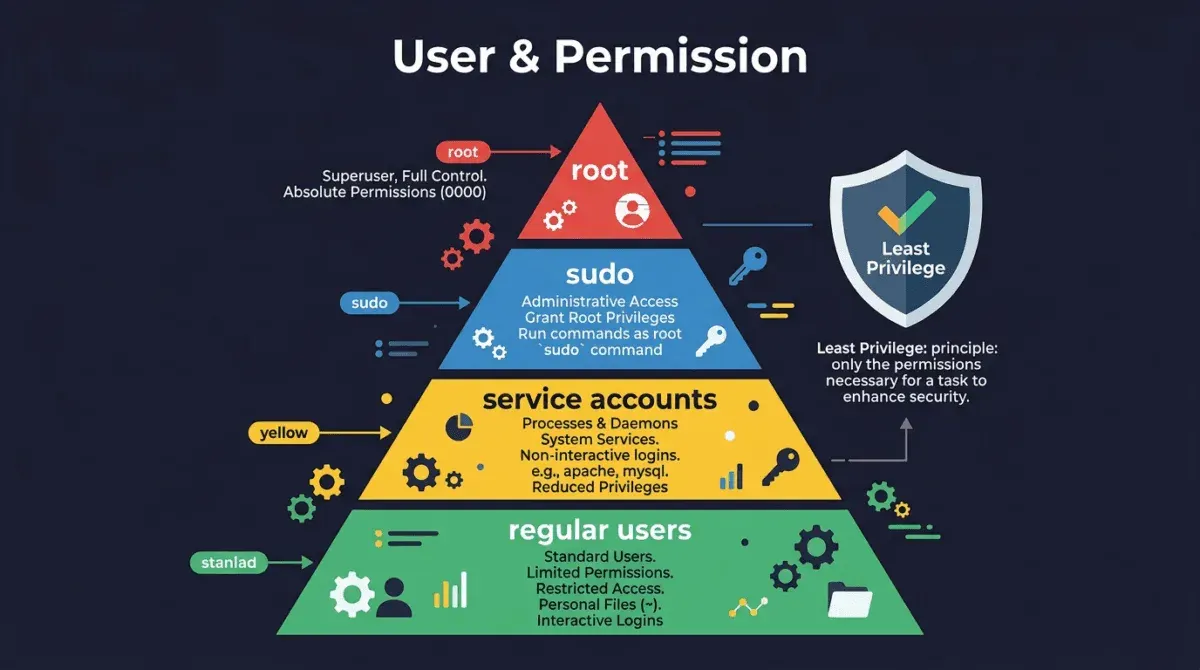
The good news is that the defense is cheap and well understood. Create a normal user so you stop operating as root. Replace passwords with SSH keys, which cannot be brute-forced in any human lifetime, and then turn password login off entirely. Set a default-deny firewall that opens only the ports you actually use. Add fail2ban so the few attackers who reach your allowed SSH port get banned after three bad guesses. Keep the system patched, ideally automatically. None of this is exotic, and all of it together makes your server a non-target. The bots move on to easier prey, of which there is an endless supply.
The mental model that makes it click
Linux administration feels like memorizing trivia until a few mental models snap into place, and then it feels like a language you can speak. There are really only a handful.
Everything is a file, and everything has an owner and a set of permissions expressed in three little triads. Once you can read -rwxr-x--- at a glance, half the mysteries of “permission denied” evaporate. Every running program is a process with a number, and you can see them, prioritize them, and kill them. Long-running programs are supervised by systemd, so systemctl and journalctl become the two verbs you use a hundred times a day, one to control services and one to ask them what went wrong. And the system keeps a diary; when something breaks, it almost always already told you, in journalctl or under /var/log, if you have the habit of asking.
Hold those models and the commands stop being incantations. You are not memorizing spells; you are giving instructions to a system whose logic you understand.
Reliability is a set of habits, not a feature
The final lesson is the one that only experience teaches: the difference between a hobby server and a production one is not capability but discipline. The same nginx serves both. What differs is whether there is a backup, and whether anyone has ever tested restoring it. Whether the disk usage is watched before it hits a hundred percent rather than after. Whether logs rotate or quietly grow until they take the machine down. Whether, when something fails at an inconvenient hour, there is a calm method, check the service, read the journal, check the host, change one thing, re-test, instead of panicked guessing.
None of these are things you add at the end. They are habits you carry from the first ten minutes, and they are precisely what make the cheap, scary, five-dollar machine into something you can actually depend on. Learn to run one server well and you have not learned a trick; you have learned the foundation that every cloud platform, container orchestrator, and fleet of a thousand machines is quietly built on top of.
Key takeaways 5
- A VPS removes the abstraction managed platforms hide.
- Security comes first: SSH keys, firewall, updates.
- Disable password and root login over SSH.
- Understand services, logs, users and permissions.
- Reliability comes from backups, monitoring and routine.
Watch & learn

Frequently asked questions
What is a VPS?
A Virtual Private Server is a virtual machine rented from a hosting provider, giving you a dedicated Linux environment with root access at low cost.
What should I do first on a new Linux VPS?
Update packages, create a non-root user with sudo, set up SSH key authentication, disable password and root login, enable a firewall and configure automatic security updates.
Is a VPS better than managed hosting?
A VPS gives more control and is often cheaper, but you're responsible for security, updates and backups. Managed hosting trades control for convenience.
Go deeper with the free masterclass
Workshop, PDF handbook and curated resources for “VPS & Linux Server Administration”.
Related articles
Full PhotoPrism Setup Guide on Raspberry Pi (or Linux Server)
Step-by-step guide to self-hosting PhotoPrism on a Raspberry Pi or Linux server with Docker, an external drive and auto-start on boot.
Comprehensive Guide to Setting Up Ubuntu on Your Local Machine | 02x00.06-02
Setting up a robust coding environment on your local machine is essential for efficient software development.

A Comprehensive Guide to Raspberry Pi Crypto Mining: Turn Your Pi into a Money Maker
Are you ready to delve into the world of cryptocurrency mining with your Raspberry Pi?
Comments
No comments yet. Start the conversation.